






The 2026-27 First Supplementary Budget sets out the Welsh Government's in-year changes to the spending plans for the financial year. It outlines how much money has been allocated to the Welsh Government, its associated departments and agencies, such as health boards and local authorities. The 2026-27 First Supplementary Budget was published on 23 June 2026.
The infographics below summarise the key allocations by government department and how these have changed from the Final Budget 2026-27 (restated June 2026).
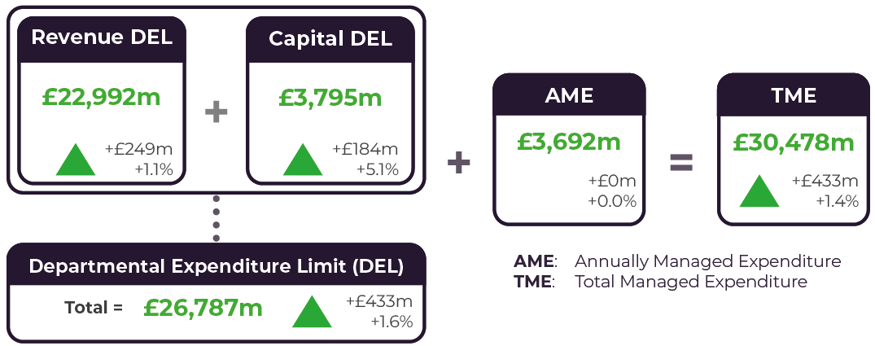
Changes between the Departmental Expenditure Limits in the First Supplementary Budget 2026-27, from the Final Budget 2026-27 (restated June 2026)
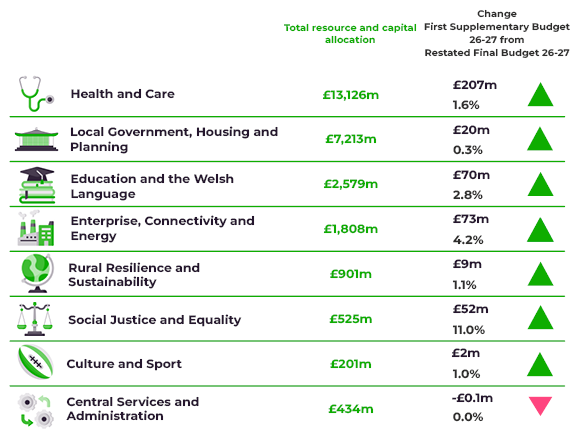
Changes between the Main Expenditure Groups in the First Supplementary Budget 2026-27, from the Final Budget 2026-27 (restated June 2026)
About this visualisation
You can use this tool to explore the 2026-27 First Supplementary Budget allocations at different levels, from Main Expenditure Group portfolio down to Budget Expenditure Line (the most detailed level available).
The values shown in the diagram and table are resource (or revenue) plus capital allocations (comprising general capital and Financial Transactions Capital allocations) and excluding Annually Managed Expenditure funding. The size of each node is scaled according to the value of the allocation and its proportion of the budget. Different colours represent different portfolios.
The table also shows corresponding allocations in the restated 2026-27 Final Budget, along with the changes between these and the First Supplementary Budget 2026-27 in cash and percentage terms. The Welsh Government restated the 2025-26 Final Budget allocations to reflect the new ministerial portfolios and reclassify ring-fenced non-fiscal resource budgets to Annually Managed Expenditure.
Under 'view options', you can select to display the percentage change on the restated 2026-27 Final Budget. In this view, the circle sizes scale with the percentage difference in the budget allocation. The node colours are red for a decrease and blue for an increase, with darker shades indicating a larger percentage change.
Controls for the table positioning and a full-screen mode are available in 'view options'.